
- nas
- hardware
- ugreen
A NAS for photos, documents and passwords: picking the hardware
This is the first part of a series about my home server: a NAS I wanted to fully control, robust, and getting updates daily. In this one: why I started, what I wanted to run on it, and how I picked the hardware.
The trigger: OneDrive and the Samsung Gallery
With my Samsung phone, I’ve used the Samsung Gallery synced with my Microsoft OneDrive account to store my pictures since forever, paying 2 € per month for 100 GB of OneDrive. The integration offered the Samsung UI and features with the OneDrive storage, so I was pretty happy about it.
However, when Samsung ended the sync with OneDrive12, all images which were not downloaded on my phone disappeared from the gallery. I had to use both apps to browse my gallery.
In addition, my OneDrive was full for quite some time, and I was constantly deleting photos and videos to make some room. If I wanted more, the next storage tier for OneDrive jumps from 2 € to 6.99 € per month. Other cloud providers may be cheaper, but migrating is always a pain, and if I had to switch anyway, I’d rather self-host.
Why build it myself
Depending as little as possible on a third party to store my memories was one of the goals, but let’s be honest: I wanted to have fun building and experimenting with my own home server.
I’m a software engineer at Red Hat, working on Podman Desktop, and as our team is building tools for developers using technologies like bootable containers (bootc) and Podman, I wanted to use those technologies on my own to get as close as possible to a real production environment.
Another aspect I found interesting: with the growing number of security vulnerabilities appearing at every level (PHP2Shell in PHP3, NoisyTCP in the Linux kernel4, nginx2root in nginx5), I wanted to find how I could leverage those tools to make self-hosting robust, keep the data safe, and ensure my system gets updates daily. That’s the primary goal of this series.
What I wanted to run
I spent quite some time deciding which projects would match my needs (I won’t go into the details of why for each one here). The initial list is Immich for the photos and videos, Paperless-ngx for the documents, and Vaultwarden for the password management.
Before selecting the hardware I ran some measurements in a dedicated Fedora VM, to orient my search. What I found out: about 3 GB of RAM for the three apps (at rest), but Immich’s machine learning loads models when it works, and they mention a minimum of 6 GB6 (the OS is not counted in this chart).
- Immich 2.37 GB
- Paperless-ngx 0.58 GB
- Vaultwarden 0.06 GB
Show as a table
| App | Includes | GB |
|---|---|---|
| Immich | server 1.54, Postgres 0.62, machine learning 0.21 | 2.37 |
| Paperless-ngx | Paperless 0.575, Valkey 0.007 | 0.58 |
| Vaultwarden | one process, SQLite | 0.06 |
| Total | 3.01 |
With those results and with the price of the RAM I thought it would be fine to start with 8 GB of RAM. (Spoiler: Immich can use 3 to 5 GB during its first import, so I added a 16 GB stick later, found for 50 €.)
What I was looking for
As this was my first NAS/home server, I wanted to start small. I don’t really need a lot of storage: I have about 100 GB of images and videos. I expect this to grow in the future, but a few TB would be enough for a very long time.
As I have a lot of personal projects, the home server will probably host some of my apps in the future, so I wanted a decent CPU, an upgradable RAM slot, and preferably a “cheap” solution.
For the storage, I wanted 2 disks mirroring each other, so a dead disk doesn’t lose anything, and an off-site backup in case the NAS is lost.
Why UGREEN
I searched online for those criteria, and between Synology and UGREEN, I chose UGREEN because their NAS usually have a better CPU in similar price ranges.
I was looking for either the UGREEN NASync DXP2800 (Intel N100) or the GT version (AMD). I was lucky to find the GT version on leboncoin.
The design
This is the one I bought. I find it slim and cool-looking.
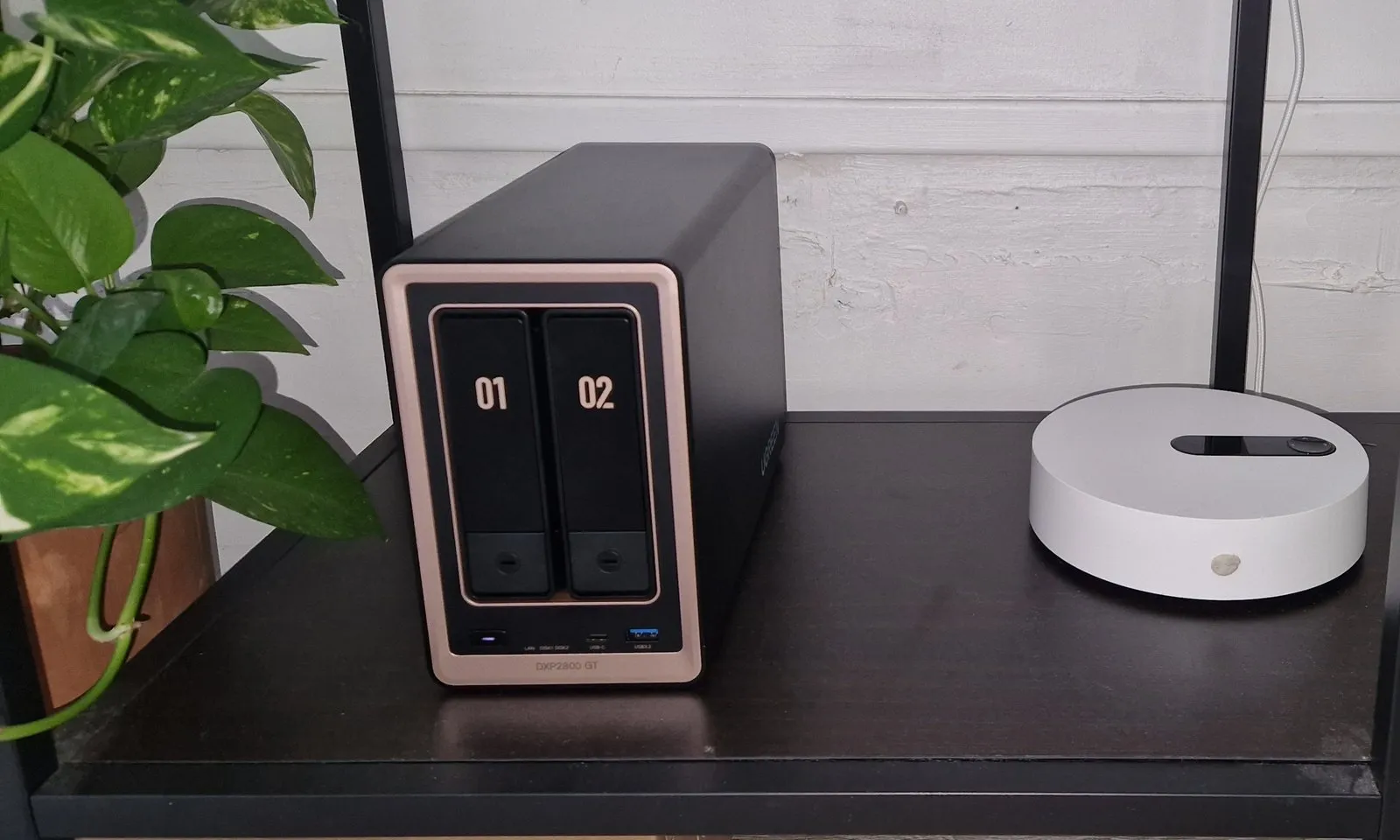
What’s inside
For the price I’m pretty happy with the specs: the CPU was released in 2022 and the box has 8 GB of RAM, so I feel like this should last some time. Here is all the hardware:
- Processor
- AMD Ryzen Embedded R2514, 4 cores / 8 threads, Radeon Vega iGPU with hardware video encoding
- Memory
- 2 DDR4 SO-DIMM slots: 8 GB from the factory, 24 GB with a 16 GB Lexar module added
- System disk
- WD_BLACK SN7100 1 TB NVMe for the OS and the apps; a second M.2 slot is free
- Data disks
- 2× WD Red Plus 4 TB (CMR), mirrored: 4 TB usable
- Network
- One 10 GbE port
- Security
- TPM 2.0, used later to encrypt the disks
Second hand for the box, new for the disks
To reduce the cost of my project, I bought the box and the RAM second hand on leboncoin; the disks and SSD I bought new, because I want to have the warranty if anything happens.
| Item | Where | Bought | Price |
|---|---|---|---|
| UGREEN NASync DXP2800 GT | leboncoin | Sep 2026 | 329 € |
| Lexar DDR4-3200 16 GB | leboncoin | Nov 2026 | 50 € |
| WD_BLACK SN7100 1 TB NVMe | Amazon | Nov 2026 | 196 € |
| 2× WD Red Plus 4 TB | Amazon | Nov 2026 | 437 € |
| Total | 1,012 € |
Will it ever pay for itself?
The honest answer is never. Storage prices have mostly been flat for years: storing a GB on Amazon S3 costs the same as in 20167, my 2 € OneDrive plan never changed, and hard drives even got more expensive recently8.
If the goal was to save money, replacing 2 €/month (24 €/year) with a home server, where I need to pay for the hardware, the electricity, and potential new pieces in case of failure, I don’t think I will be saving a lot! The hardware alone is 42 years of my OneDrive plan, and the electricity (15 to 20 W at idle9, at about 0.20 € per kWh10) already costs more than 2 € per month.
Footnotes
-
Samsung: What has changed with Sync with OneDrive in the Gallery app. ↩
-
oss-security: CVE-2026-109618, PHP 8.2–8.5 RCE via OOM corruption (October 2026, fixed in PHP 8.2.35, 8.3.36, 8.4.27 and 8.5.12). ↩
-
NVD: CVE-2026-99288 (“NoisyTCP”, November 2026, a pre-authentication crash in the kernel’s TCP lookups). ↩
-
oss-security: CVE-2026-123633, CVE-2026-123007, nginx RCE via HTTP/2 (November 2026). ↩
-
Immich documentation: Requirements (6 GB minimum, 8 GB recommended). ↩
-
AWS News Blog: S3 and Glacier price reductions: S3 Standard at $0.023 per GB per month from December 2016, still the price in 2026. ↩
-
TechPowerUp: HDD prices increase by an average of 46% over the past four months (January 2026). ↩
-
Notebookcheck: Small, fast and surprisingly quiet: Ugreen NASync DXP2800 GT review. ↩